


Does a Market Data API Support Historical Tick Data? The Difference Between Real-Time Market Data and Historical Data
Does a market data API support historical Tick data? Learn the differences between real-time Tick, latest quotes, historical Tick, and K-line data, plus how to collect and store Tick data for analysis.
If you are developing a quantitative trading system, you may have encountered a common question: if a market data API can continuously push real-time Tick data, why can't you use it to retrieve the complete trade-by-trade history of a stock from yesterday?
For example, suppose a strategy starts subscribing to Tencent Holdings (700.HK) at 10:00 today. The program can receive trade prices, trade volumes, and trade times from that point onward. But if you now want to replay all trades that occurred between 10:00 and 11:00 yesterday, the current real-time subscription alone clearly cannot provide them.
The reason is that a real-time market data API providing Tick streaming does not necessarily mean that it also provides historical Tick queries.
For quantitative developers who need trade-by-trade analysis, strategy backtesting, and historical market replay, it is important to distinguish between real-time Tick data, the latest quote, and historical Tick data when selecting an API. They may look similar, but they serve different data requirements.
What Is the Difference Between Real-Time Tick Data, the Latest Quote, and Historical Tick Data?
Let's first look at three common ways to obtain market data.
| Data Type | Main Access Method | What You Can Get | Main Use Cases |
|---|---|---|---|
| Real-time Tick | WebSocket | Continuous trade-by-trade updates while connected | Real-time market monitoring, trade analysis |
| Latest Quote | REST API | Current latest trade price and related quote fields | Page initialization, periodic refreshes |
| Historical Tick | Historical data query API | Trade-by-trade records within a specified historical time range | Trade replay, Tick-level backtesting |
The first two are where confusion most often occurs.
A REST API returning the latest trade price for a stock does not mean that it can return every trade from the previous hour. Even if the response contains fields such as tick_time, price, and volume, those fields only describe the latest quote information. They do not prove that the API supports historical Tick queries.
Using AllTick as an example, its REST API provides the latest quote and historical K-line data, while the latest quote API does not support historical trade-by-trade Tick queries. The traditional HTTP /trade-tick interface is also designed for retrieving the latest trade price rather than searching historical trade records.
AllTick WebSocket works differently. The client sends a trade subscription request (cmd_id: 22004), and after confirmation, the server pushes real-time trade data through cmd_id: 22998.
The pushed messages contain fields such as code, seq, tick_time, price, and volume, which can be used to identify the instrument, record trade times, and store trade data.
Therefore, when determining whether a market data API supports historical Tick data, you should not simply check whether it contains Tick fields. You should confirm whether there is an API that can return multiple trade records for a specified historical time range.
Can Historical K-Line Data Replace Historical Tick Data?
No. This is another important point when selecting historical market data.
Suppose Tencent Holdings has multiple trades during the minute from 10:01:
Time             Code      Trade Price     Volume
10:01:00.125    700.HK    398.10          200
10:01:00.386    700.HK    398.10          500
10:01:01.027    700.HK    398.20          300
10:01:01.641    700.HK    398.15          100
The data above is simulated data used to illustrate the data structure and does not represent actual market trades.
If these trades are aggregated into a one-minute K-line, the result might look like this:
Time       Open     High     Low      Close
10:01      398.10   398.20   398.10   398.15
The difference between the two types of data is clear.
A K-line preserves aggregated information such as the open, high, low, and close prices over a period of time. It does not preserve the individual time, price, and volume of every trade.
For applications that only need historical charts, moving averages, or conventional technical indicators, historical K-lines are usually sufficient. If a strategy depends on the order of individual trades, trade direction, or finer-grained price movements, K-lines cannot provide the same level of information.
AllTick's REST API provides historical K-line queries and supports multiple periods ranging from 1 minute to monthly intervals. A single product query can return up to 500 bars. For stocks, 2-hour and 4-hour K-lines are not supported, and the shortest supported period is 1 minute.
This means developers can use AllTick to obtain the historical K-line data they need, but this capability should not be interpreted as a historical Tick data service.
How Should You Design Data Collection If You Need Historical Tick Data?
If a strategy genuinely depends on historical trade-by-trade data, a practical approach is to build your own Tick data collection and storage pipeline in advance.
For example, you can subscribe to 700.HK from today onward, receive real-time trade updates through WebSocket, and save each message to a local database. When historical replay is needed later, you can query the records by symbol and trade time.
The basic workflow looks like this:
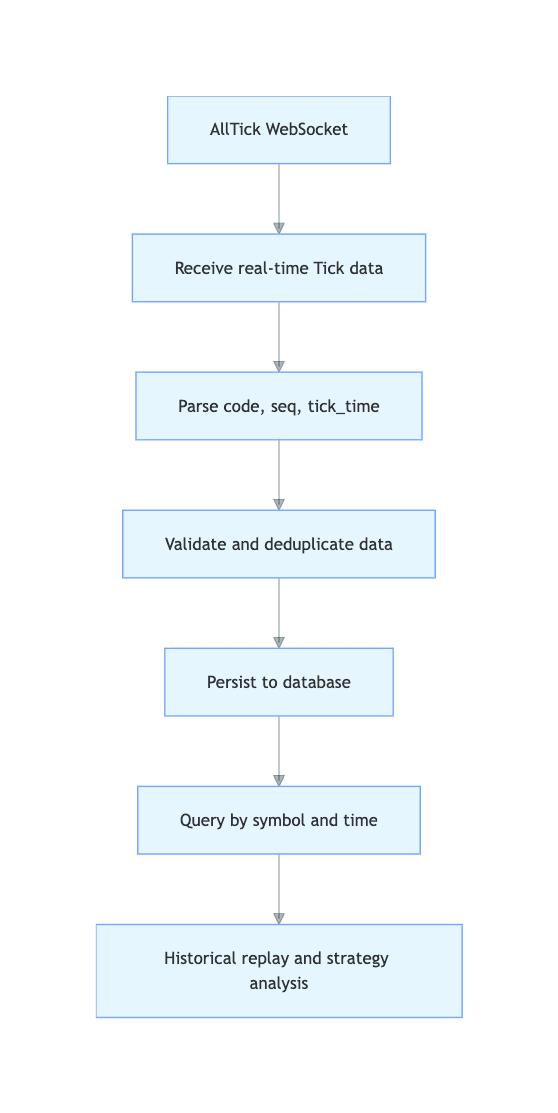
The following example uses Python and SQLite to demonstrate how to store AllTick trade updates after they are received.
import json
import sqlite3
import time

db = sqlite3.connect("ticks.db")

db.execute("""
CREATE TABLE IF NOT EXISTS ticks (
    code TEXT NOT NULL,
    seq TEXT NOT NULL,
    tick_time_raw TEXT NOT NULL,
    price TEXT NOT NULL,
    volume TEXT,
    trade_direction INTEGER,
    received_at_ms INTEGER NOT NULL
)
""")

def save_tick(raw_message):
    message = json.loads(raw_message)

    if message.get("cmd_id") != 22998:
        return

    tick = message.get("data") or {}

    if not all(k in tick for k in (
        "code", "seq", "tick_time", "price"
    )):
        return

    db.execute("""
        INSERT INTO ticks VALUES (?, ?, ?, ?, ?, ?, ?)
    """, (
        str(tick["code"]),
        str(tick["seq"]),
        str(tick["tick_time"]),
        str(tick["price"]),
        tick.get("volume"),
        tick.get("trade_direction"),
        time.time_ns() // 1_000_000
    ))

    db.commit()
This code demonstrates the persistence logic for trade updates. It needs to be called from a WebSocket message handler and does not include connection, subscription, heartbeat, or automatic reconnection logic. In a production environment, you should also consider using a message queue or batch writes instead of synchronously committing a database transaction for every trade.
There are also two details that are easy to overlook.
First, do not store only the trade price and trade time. The seq field can be stored as the source sequence number and retained together with the original message for later verification. When implementing deduplication, first confirm the scope in which the sequence number is unique. Do not simply use a combination of price, volume, and timestamp to determine whether two trades are duplicates.
Second, distinguish between the time when the trade occurred and the time when your application received the message. In the example above, tick_time_raw stores the original time field from the market data message, while received_at_ms records when the program received the message. Keeping both allows you to analyze network transmission latency later and helps prevent time conversion issues from affecting historical ordering.
Can Historical Data Be Recovered After a WebSocket Disconnection?
This is one of the most important issues to consider when collecting historical Tick data yourself.
Suppose your market data system receives trades normally from 10:00 to 10:30, but a network failure causes the connection to drop between 10:30 and 10:35. At 10:35, the application reconnects and resumes receiving real-time updates.
That does not mean the data from 10:30 to 10:35 will automatically be recovered.
Resubscribing solves the problem of receiving subsequent real-time data. It does not restore trade records that were missed in the past. Especially when no usable historical Tick recovery API is available, reconnecting does not eliminate the data gap in your local database.
Therefore, a production system should at least do three things: record the disconnection and recovery times, monitor the timestamp of the latest received trade message, and mark the affected time range whenever a data gap is detected. Whether the missing data can subsequently be recovered depends on whether the data source provides the corresponding historical Tick data.
This is particularly important for quantitative backtesting. If several minutes of trade data are missing but the entire period is still treated as complete historical data, the backtest results may no longer be reliable.
Three Questions to Ask Before Choosing a Market Data API
Before deciding on a technical solution, I recommend translating your requirements into specific API-level questions instead of simply checking whether a product page says it supports Tick or historical market data.
- Can you query trade-by-trade data for a specified historical time range? Make sure the API can return multiple historical trade records rather than only the latest quote.
- Does the historical data contain the fields you need? For example, trade time, trade price, trade volume, trade direction, and required sequence information.
- Is historical data available for recovery after a real-time disconnection? If not, you need to monitor data gaps yourself and prepare an independent historical data source.
For AllTick, what can be clearly confirmed is that WebSocket is used to receive real-time trade updates, while the REST API provides the latest quote and historical K-line queries. The publicly available latest quote API does not support historical trade-by-trade Tick queries. If a project needs to retrieve the complete trade records for a specific historical trading day in bulk, this should be confirmed with AllTick during the technical evaluation stage to determine whether an independent data delivery option is available for the relevant market and time range. A real-time API should not simply be treated as a historical data service.
If your project mainly needs real-time market display and historical K-line analysis, you can combine AllTick's REST API and WebSocket API to handle historical queries and real-time streaming separately. If historical trade-by-trade data is a business requirement, first confirm that the required historical data is actually available, and then decide whether to start building your own Tick data repository from the present onward.
You can review the AllTick REST API documentation and AllTick API onboarding tutorial to understand the API types, authentication methods, and real-time trade subscription workflow, and then determine the appropriate data collection approach for your strategy.
Usage Notice: Data provided by AllTick is for informational purposes only and is not intended for trading or investment purposes. Specific data permissions, API limitations, and permitted usage should be determined according to the latest official documentation and account agreement.