


How Should You Handle Order Book Level Changes When Retrieving Bid and Ask Data Through a Real-Time Market Data API?
How should a real-time market data API handle order book changes? Learn how to process WebSocket depth updates, sort bid and ask levels, handle missing levels, and maintain an accurate current order book.
When developing a real-time market data interface, the bid and ask sides of an order book may look like nothing more than a few lines of prices and quantities. However, once the API is connected, the real challenge is often not how to retrieve the data, but how to update it when the next message arrives.
For example, an order book for a stock may initially show a best bid of 320.10 and a second-best bid of 320.05. A few seconds later, the best bid may change to 320.15, while the previous best bid moves down to the second level. If the application simply appends each new message to an array, duplicate price levels and incorrect price ordering can quickly appear. The interface may even continue displaying order quantities that are no longer present in the latest book.
Therefore, when processing bid and ask data, the key is to determine whether the API returns the current order book state or only the changes, and then decide how the application should maintain its local order book.
Don't Treat Order Book Changes Like Ordinary Market Data
For ordinary real-time market data, the main concern is usually the latest traded price. An order book is different. It contains multiple bid and ask price levels, and each update may change prices, quantities, and the positions of individual levels.
For example, an application might maintain the following bid-side structure:
Bid Level 1  320.15  1800
Bid Level 2  320.10  2500
Bid Level 3  320.05  1200
After receiving the next update, the data may look like this:
Bid Level 1  320.20  900
Bid Level 2  320.15  1600
Bid Level 3  320.10  2100
This does not mean that the application should simply insert 320.20 into the existing list. The new order book represents an updated state of the entire bid side. The previous price levels must also be reorganized according to the new data.
This is why order book processing should not directly reuse the same logic used for Tick data.
When using a real-time market data API that supports order book streaming, the first step is to confirm the semantics of its messages. Does the API send a complete order book snapshot, or does it send only the price levels that have changed? These two approaches require completely different local update methods. When a message returns the current bids and asks, you should not assume that it represents incremental data without verifying the protocol. Otherwise, repeatedly adding the same data can result in an incorrect order book.
WebSocket Is Better Suited to Continuous Order Book Updates Than Repeated Polling
When a page needs to continuously display changes from the best bid and ask through deeper price levels, frequently calling an HTTP API is not ideal.
HTTP requests are more suitable for situations where an application needs to ask, "What does this stock's order book look like right now?" WebSocket is more suitable when the application needs to receive new data continuously as the order book changes.
AllTick's WebSocket order book subscription uses 22002 to request a subscription, and the server pushes order book data through 22999. During subscription, applications can specify code and depth_level, allowing them to select the order book depth according to their display requirements. The official documentation also notes that less active instruments may return fewer levels than the maximum supported depth. This should not automatically be treated as an API error.
For example, a simple Python subscription can be implemented as follows:
import json
import websocket

url = "wss://quote.alltick.co/quote-stock-b-ws-api"

def on_open(ws):
    request = {
        "cmd_id": 22002,
        "seq_id": 1,
        "data": {
            "symbol_list": [
                {
                    "code": "700.HK",
                    "depth_level": 5
                }
            ]
        }
    }

    ws.send(json.dumps(request))

def on_message(ws, message):
    data = json.loads(message)

    if data.get("cmd_id") == 22999:
        order_book = data.get("data", {})
        print("bids:", order_book.get("bids"))
        print("asks:", order_book.get("asks"))

ws = websocket.WebSocketApp(
    url,
    on_open=on_open,
    on_message=on_message
)

ws.run_forever()
One detail that is easy to overlook is the purpose of this code. It is responsible for receiving order book messages. It does not mean that the application should simply call append() every time a new message arrives.
A more appropriate approach is to parse the incoming message and reorganize the bid and ask data structures according to price. For example, if the frontend always needs to display five levels, the data can be normalized as follows:
function normalizeOrderBook(data, depth = 5) {
    const bids = (data.bids || [])
        .sort((a, b) => Number(b.price) - Number(a.price))
        .slice(0, depth);

    const asks = (data.asks || [])
        .sort((a, b) => Number(a.price) - Number(b.price))
        .slice(0, depth);

    return { bids, asks };
}
The bid side is generally sorted from highest to lowest price, while the ask side is sorted from lowest to highest. This keeps the order book display consistent regardless of the order in which the server returns the data.
Don't Assume Every Market Has the Same Order Book Depth and Quantity Fields
Another issue that developers can easily overlook is that the available order book depth varies across markets.
According to AllTick's current documentation, the maximum order book depth is up to 10 levels for Hong Kong stocks and up to 5 levels for A-shares and cryptocurrencies. US stocks, as well as certain forex, precious metals, crude oil, and CFD index markets, may support only one level. Less active instruments may return fewer levels than these maximums.
For this reason, the frontend should not hardcode the number of levels:
for (let i = 0; i < 5; i++) {
    renderLevel(data.bids[i]);
}
A safer approach is to render the levels based on the data actually returned:
(data.bids || []).forEach((level, index) => {
    renderBidLevel(index + 1, level);
});

(data.asks || []).forEach((level, index) => {
    renderAskLevel(index + 1, level);
});
This way, even if an instrument returns only one level, the application will not encounter errors by trying to access array elements that do not exist.
There is another market-specific detail to consider when displaying order quantities. AllTick's order book documentation states that volume is not provided in order book data for forex, precious metals, and CFD indices, while stock and cryptocurrency data include volume. Therefore, the frontend should not assume that both price and quantity fields are available across every market when designing a unified data structure.
Maintaining the Current State Is the Key to Order Book Updates
For applications such as market monitoring systems and order book displays, a practical approach is to treat each WebSocket message as an update to the current order book state, rather than permanently accumulating every message.
The data flow can be organized as follows:
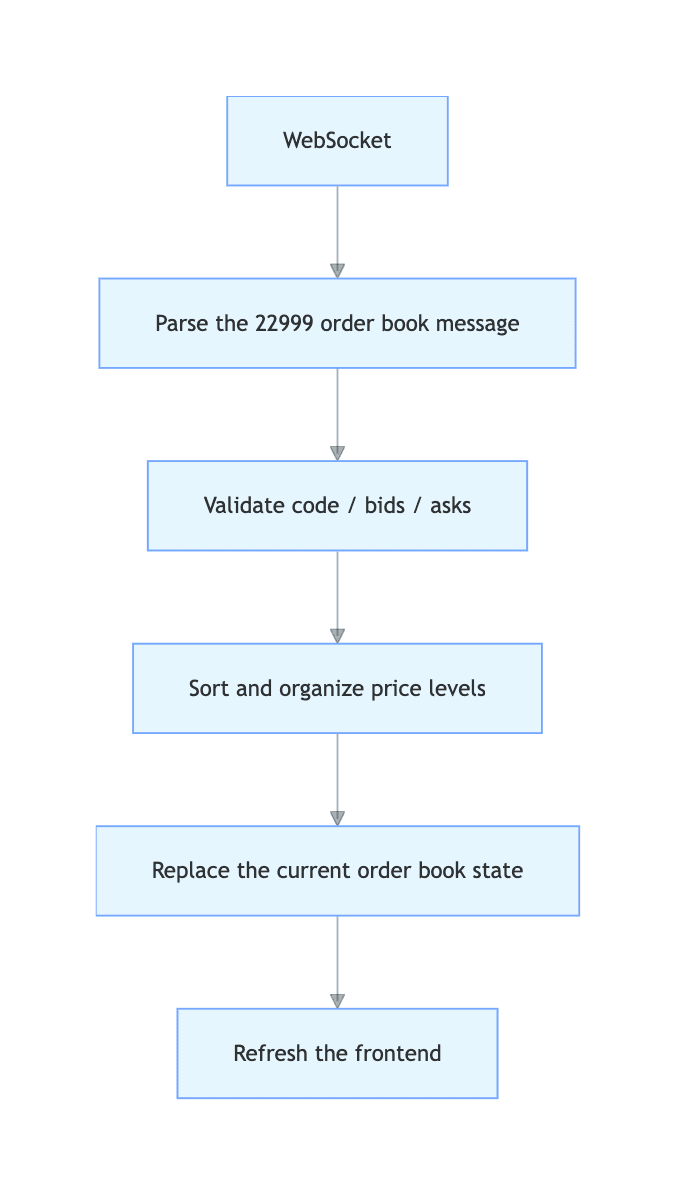
If the application also needs to calculate bid-ask spreads, order book imbalance, or depth changes, these calculations should be performed after updating the current state, rather than by directly accumulating values from the raw messages.
For example:
function getSpread(orderBook) {
    const bestBid = orderBook.bids?.[0];
    const bestAsk = orderBook.asks?.[0];

    if (!bestBid || !bestAsk) {
        return null;
    }

    return Number(bestAsk.price) - Number(bestBid.price);
}
The advantage of this approach is straightforward: the object stored in memory always represents the current order book, rather than a mixture of dozens of previous messages.
If the application needs to record order book changes for purposes such as order book replay, depth change analysis, or bid and ask behavior research, each valid message can be stored separately in a database or message queue after the current state has been updated. Real-time display and historical recording are best handled as two separate processing layers.
When Choosing a Real-Time Market Data API, Don't Focus Only on Whether It Provides the Best Bid and Ask
For developers, the factors that really affect an order book system are not simply the API's name. More important considerations include supported markets, maximum order book depth, whether quantity fields are available, whether the API provides snapshots or incremental updates, whether data is delivered through HTTP or WebSocket, and what connection and subscription limits apply.
AllTick provides both REST and WebSocket data interfaces. REST can be used to retrieve the latest order book, while WebSocket is suitable for continuously receiving real-time order book updates. For market monitoring applications that need continuous order book updates, receiving depth data through WebSocket and maintaining the current order book state at the application level is a better fit for this type of data workflow. AllTick's product page also lists Order Book and Real-time Tick as part of its real-time market data capabilities.
Before connecting, however, developers should confirm the supported order book depth for the specific market and instrument. The results returned for one particular stock should not be used to assume that all instruments support the same number of levels.
For a system that genuinely needs real-time bid and ask data, the most important thing is not simply to display the order book. It is to ensure that the application always knows what the order book looks like at that moment. Once message semantics, price level ordering, empty levels, and market-specific differences are handled properly, subsequent tasks such as spread calculations, depth visualization, and order book analysis become much easier.
If you are developing a real-time market monitoring application, trading terminal, or quantitative research tool, you can refer to AllTick's WebSocket API documentation and select the appropriate order book subscription method and depth level for your target market.