


How to Choose a US Stock API to Avoid Data Delays: Comparing WebSocket, REST, and Push Mechanisms
Learn how to choose a US stock API with lower data delivery delays. Compare REST and WebSocket, understand polling limits, real-time push, reconnection, and how to monitor end-to-end market data latency.
One of the most frustrating problems when developing a US stock market monitoring dashboard is that the API connection works normally, but stock prices do not update promptly. Some prices only appear after the next request, some stocks show no changes for an extended period, and in other cases, the server has already received the data but the updates have not appeared on the frontend.
These issues do not necessarily mean that the market data source itself is delayed. For fintech developers, the real task is to examine the entire data delivery pipeline, from market event generation and API transmission to client-side processing and display.
When choosing a US stock API, REST and WebSocket are two common ways to retrieve market data. They differ in their communication mechanisms, update timing, and connection management. Understanding these differences can help reduce unnecessary polling requests and build a more reliable real-time US stock market data system.
US Stock Market Data Delays Do Not Always Originate from the API
Market data typically passes through several stages before reaching the user interface.
- Market data collection: The data source generates new trade or quote information.
- Server-side processing: Market data is organized and processed.
- Network transmission: Data is transferred from the server to the developer's application server.
- Client-side processing: The application parses market data messages and updates its cache, business logic, and frontend.
A delay at any of these stages can affect the final display time.
For example, suppose a monitoring system calls a REST API every five seconds. Even if the API can return data quickly, a stock price may change between two requests. In that case, the application must wait until the next request to obtain the updated data.
When request intervals are fixed and price changes occur at approximately random times, the polling wait can range from 0 to 5 seconds, with an average of around 2.5 seconds. This does not include HTTP network round-trip time or server-side processing time.
More importantly, a REST query typically returns the latest available data snapshot at the time of the request. It does not necessarily provide every price change that occurred between two requests.
Therefore, when analyzing US stock market data delays, it is important to distinguish among three timestamps:
tick_time: The event timestamp included in the market data message.received_at: The time when the application server actually receives the message.rendered_at: The time when the frontend finishes displaying the update.
Recording these three timestamps separately makes it easier to determine whether a problem occurs during data transmission or within the application's own processing pipeline.
When calculating the difference between the market event timestamp and local reception time, first verify the timestamp unit and timezone, and ensure that the server clock is synchronized. For processing time within the server, a monotonic clock can be used to avoid measurement errors caused by system clock adjustments.
How Should You Choose Between REST API and WebSocket?
REST and WebSocket are not direct replacements for each other. Each is suitable for different market data requirements.
| Comparison | REST API | WebSocket |
|---|---|---|
| Data retrieval | Client sends requests | Server pushes updates |
| Connection | Separate HTTP requests | Persistent connection |
| Update timing | Data is returned after a request | New messages arrive after subscription |
| Main use cases | Latest quote queries, historical K-lines | Real-time Tick data, order book updates |
| Main limitations | Polling intervals can introduce waiting time | Connection and subscription states must be managed |
REST API is suitable for retrieving market data on demand.
For example, when a user opens the details page for AAPL.US, the application can call a REST API to retrieve the latest quote or historical K-line data to initialize a chart.
This approach does not require a persistent connection. It is relatively straightforward to implement and can be integrated into existing backend services more easily.
However, if an application needs to continuously monitor dozens of stocks, high-frequency polling increases the number of requests. Request frequency is also subject to API plan limits. Even with shorter polling intervals, it is not possible to guarantee that every intermediate price change will be captured.
WebSocket is more suitable for continuous market data updates.
After establishing a WebSocket connection, the client sends a subscription request. The server can then push new market data messages when updates matching the subscription become available.
For example, a US stock monitoring dashboard may subscribe to AAPL.US, MSFT.US, and NVDA.US at the same time. Instead of repeatedly sending HTTP requests for each stock, the application can receive the corresponding Tick updates through a persistent connection.
This reduces the overhead of repeated requests and eliminates the waiting interval associated with polling.
However, WebSocket does not eliminate all forms of latency. Upstream market data updates, network routing, message queues, and frontend rendering can still affect the final display time. WebSocket addresses the data delivery mechanism; it does not remove delays from every stage of the data pipeline.
Use REST to Initialize Market Data and WebSocket for Continuous Updates
For applications that need to display both historical market data and real-time prices, it is usually unnecessary to rely on only one type of API.
A more practical approach is to assign different responsibilities to REST and WebSocket.
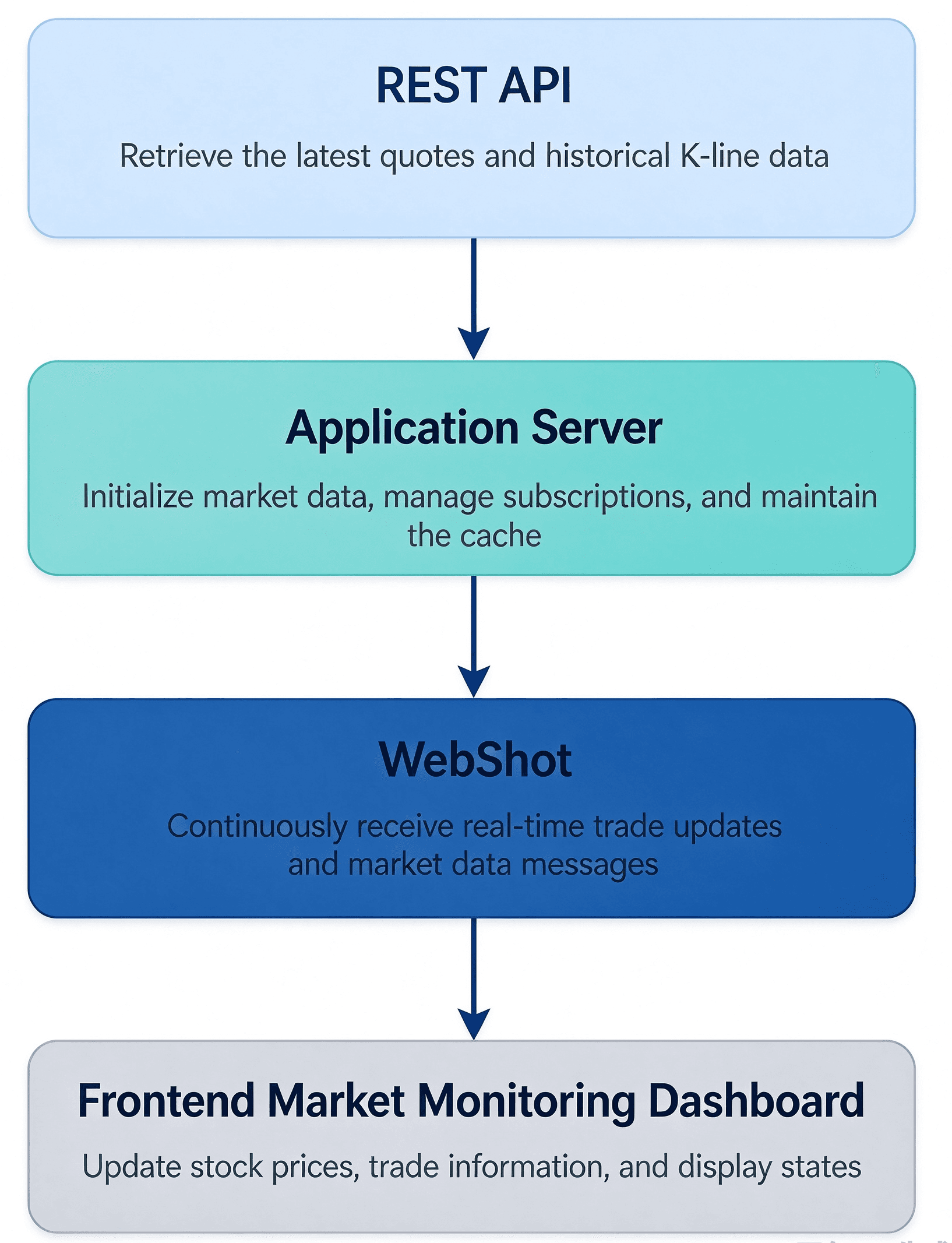
In an actual implementation, the REST API can handle the initial retrieval of stock information and historical market data, while WebSocket handles subsequent real-time trade updates.
For example, a developer can first retrieve historical K-line data for AAPL.US and then subscribe to its real-time Tick data. When a new trade message arrives, the application updates the latest price and processes the corresponding chart display according to its business requirements.
There is another issue that is easy to overlook: reconnecting a WebSocket after disconnection does not automatically recover data missed during the downtime.
After reconnecting, the application should resend the complete subscription list and use REST to retrieve the latest snapshot and synchronize the current display state. If the application must preserve every Tick that occurred during the disconnection, it also needs an appropriate source of historical Tick data to fill the gap. A latest quote query cannot be treated as a complete replay of historical Tick data.
Using AllTick to Subscribe to Real-Time US Stock Market Data
For developers who need access to US stock trade-by-trade data, AllTick provides a dedicated WebSocket interface for stock market data.
US stock symbols use a market suffix, such as AAPL.US, MSFT.US, and NVDA.US. Stocks use a different WebSocket gateway from other instruments, such as forex and cryptocurrencies. Developers should make sure they use the correct connection endpoint.
When subscribing to the latest US stock trade data, the main protocol commands include:
| Operation | cmd_id | Purpose |
|---|---|---|
| Trade subscription request | 22004 | Submit the stock subscription list |
| Trade subscription response | 22005 | Confirm the subscription request |
| Trade data push | 22998 | Receive real-time Tick data |
| Heartbeat request | 22000 | Maintain the connection |
| Heartbeat response | 22001 | Confirm the heartbeat |
These protocol details can be verified in the official AllTick WebSocket integration documentation.
The following Python example demonstrates a basic implementation for subscribing to real-time US stock data. It includes subscription confirmation, heartbeat messages, and reconnection after the connection is closed.
Install the dependency:
pip install websocket-clientConfigure the API Token and run the following code:
import os
import json
import time
import threading
from datetime import datetime, timezone

import websocket

TOKEN = os.environ["ALLTICK_API_TOKEN"]

WS_URL = (
    "wss://quote.alltick.co/"
    "quote-stock-b-ws-api?token=" + TOKEN
)

SYMBOLS = [
    {"code": "AAPL.US"},
    {"code": "MSFT.US"},
    {"code": "NVDA.US"}
]


def run_connection():
    heartbeat_stop = threading.Event()
    heartbeat_started = threading.Event()

    def send_heartbeat(ws):
        while not heartbeat_stop.wait(10):
            if not ws.sock or not ws.sock.connected:
                return

            heartbeat = {
                "cmd_id": 22000,
                "seq_id": 2,
                "trace": "heartbeat",
                "data": {}
            }

            ws.send(json.dumps(heartbeat))

    def on_open(ws):
        subscribe = {
            "cmd_id": 22004,
            "seq_id": 1,
            "trace": "us_stock_sub",
            "data": {
                "symbol_list": SYMBOLS
            }
        }

        ws.send(json.dumps(subscribe))
        print("Subscription request sent")

    def on_message(ws, message):
        try:
            response = json.loads(message)
        except json.JSONDecodeError:
            print("Invalid JSON message")
            return

        cmd_id = response.get("cmd_id")

        # Check subscription response
        if cmd_id == 22005:
            if response.get("ret") == 200:
                print("Subscription confirmed")

                if not heartbeat_started.is_set():
                    heartbeat_started.set()

                    threading.Thread(
                        target=send_heartbeat,
                        args=(ws,),
                        daemon=True
                    ).start()
            else:
                print("Subscription failed:", response)

        # Receive real-time trade updates
        elif cmd_id == 22998:
            tick = response.get("data", {})

            received_at = datetime.now(
                timezone.utc
            ).isoformat(timespec="milliseconds")

            print({
                "symbol": tick.get("code"),
                "price": tick.get("price"),
                "tick_time": tick.get("tick_time"),
                "sequence": tick.get("seq"),
                "received_at": received_at
            })

    def on_error(ws, error):
        print("WebSocket error:", error)

    def on_close(ws, status_code, message):
        heartbeat_stop.set()
        print("Connection closed:", status_code)

    ws = websocket.WebSocketApp(
        WS_URL,
        on_open=on_open,
        on_message=on_message,
        on_error=on_error,
        on_close=on_close
    )

    ws.run_forever()
    heartbeat_stop.set()


# Reconnect and resubscribe after disconnection
while True:
    try:
        run_connection()
    except KeyboardInterrupt:
        print("Application stopped")
        break
    except Exception as error:
        print("Connection failed:", error)

    time.sleep(3)
This code covers three main processes.
First, it establishes a dedicated stock WebSocket connection and sends a trade subscription request using 22004. The application starts the heartbeat thread only after receiving a successful 22005 subscription response.
Second, when a 22998 message arrives, the application extracts the stock symbol, trade price, market data timestamp, and sequence number. It also records the local reception time. These values can be used for subsequent latency monitoring.
Finally, if the connection closes, the application reconnects and resends the subscription list inside on_open.
A production environment should also include exponential backoff, heartbeat response timeout detection, subscription failure alerts, message caching, and persistent logging. The fixed three-second reconnection interval used in this example only demonstrates the basic process and is not a complete fault-tolerance strategy for large-scale production systems.
There are two additional limitations to consider when integrating with AllTick:
- Sending a new subscription request through the same WebSocket connection replaces the previous subscription list. When adding stocks, include all the symbols that should remain subscribed in the new request.
- WebSocket does not support K-line data push. If the application needs historical or latest K-line data, it should retrieve that information through the HTTP/REST interface instead of waiting for WebSocket messages.
Which Metrics Should You Check to Identify US Stock Market Data Delays?
A successful API connection is only the beginning. For a market monitoring system that operates continuously, it is more important to determine whether data consistently reaches the client at the expected time.
Three areas deserve particular attention.
Market Data Timestamps and Message Reception Time
Record the tick_time of each market data message and the time when the application server receives it. If market event timestamps continue to advance but the reception time shows a persistent delay, the network and server-side processing should be investigated further. Before calculating the difference, verify the timestamp format, timezone, and server clock synchronization.
Message Processing and Frontend Update Time
If the server receives messages promptly but stock prices do not update on the frontend, the problem may be related to message queue backlogs, client-side state updates, or page rendering. Recording message reception time and frontend rendering time separately helps prevent application processing delays from being mistaken for market data source delays.
Subscription Status and Plan Limits
Check whether the current subscription contains all required stock symbols, whether the WebSocket connection is being maintained properly, and whether the selected plan supports the required number of instruments and connections.
For example, AllTick's All US Stocks plan currently lists approximately 11,000 US stocks, up to 10 WebSocket connections, and 1,200 API calls per minute. For applications that need broad coverage of US stock symbols, plan selection should take symbol coverage, connection limits, and request frequency into account.
The AllTick stock API product page currently displays an approximate latency reference of 150 ms. When deploying in an actual environment, developers should still conduct end-to-end tests based on server location, network conditions, and client-side processing. This product-page reference should not be interpreted as a guaranteed fixed display latency across all user environments.
For systems primarily designed to display real-time market data, using REST for initialization and on-demand queries while relying on WebSocket for continuous trade updates is generally easier to maintain. The key is not simply to increase request frequency, but to match the data retrieval mechanism to the application's update requirements.
Teams developing US stock market monitoring systems can start by reviewing the AllTick Stock API product overview, then consult the official REST API documentation and the WebSocket integration tutorial according to their requirements. They can use their actual subscribed symbols to verify market data updates and connection stability.